5 Steps To Connect The Micro Switch
The connection method of the micro switch varies from model to model, but in general it can be based on the following steps. This article will introduce in detail how to connect a micro switch in 5 simple steps, and provide a detailed micro switch wiring diagram to further help you understand how to connect a micro switch switch.
How to connect a micro switch
Prepare tools and materials
Before you start connecting, you'll need to prepare the following tools and materials:
- Microswitches: Choose the right microswitch for your application needs.
- Wire: Make sure that the wire length is sufficient and meets the current and voltage requirements.
- Wire strippers: used to strip the wire insulation.
- Screwdriver: If your micro switch uses screw termination, you'll need a screwdriver.
- Soldering iron and solder: If you need to solder wires, you need to prepare a soldering iron and solder.
- Connector: Choose the right connector according to your specific needs.
1、Determine the type and terminal of the switch
Before connecting a microswitch, you first need to determine its type and terminal configuration. Microswitches typically have the following circuit configurations:
SPDT (Single Pole Double Throw): One common terminal and two switching terminals.
DPDT (Double Pole Double Throw): Two independent SPDT switches in one housing.
SPST NC (SPST NC): The circuit is turned on when the switch is not pressed.
SPST NO (SPST NO): The circuit is disconnected when the switch is not pressed.
DPST NO (DPST normally open): Two SPST normally open switches.
DPST NC (DPST NC): Two SPST normally closed switches.
An initial understanding of these microswitch circuit configurations can help you properly wire the microswitch to ensure that the circuit is working properly.
2. Stripping the line
Use wire strippers to strip the insulation at both ends of the wire to expose the appropriate length of copper wire. The stripping wire should be long enough to connect to the terminals of the micro switch, but not too long to avoid causing a short circuit or poor contact.
3、Connect the wires
Select the appropriate connection method according to the terminal type of the micro switch.
Quick Connect Terminals: Insert the stripped copper wire into the terminals and make sure they are securely connected.
Screw terminals: Generally, micro switches have small holes in the terminals, which can put a screw. Wrap the stripped copper wire around the screws, and then tighten the screws with a screwdriver to fix them on the micro switch terminals.
Solder the terminals: Place the stripped copper wire on the terminals and solder them together with a soldering iron and solder
Regardless of the type of connection, it is to ensure that the connection is secure and not loose, which is one of the key steps in wiring the micro switch.
4、Confirm the connection
Once connected, double-check each connection point to ensure that the wires are properly connected to the appropriate terminals. Confirm that all connections are strong and that there are no exposed copper wires to avoid short circuits.
5、Test the connection
After completing the above steps, proceed to the final test. Turn on the power supply, press and operate the micro switch, and observe whether the response of the circuit is consistent with the expected effect. The observation switch works properly when pressed and released. If something goes wrong, recheck the wiring of the micro switch to make sure that each connection is correct and not loose.
Recognize the types of micro switch circuits
There are several types of micro switches, each with a different circuit configuration. For example, SPDT (Single Pole Double Throw): one input (COM) and two outputs (NO and NC) can realize the switching function of one input and two outputs. Understanding these circuit configurations will help you better wire micro switches and design micro switch connection diagrams.
SPDT (Single Pole Double Throw)
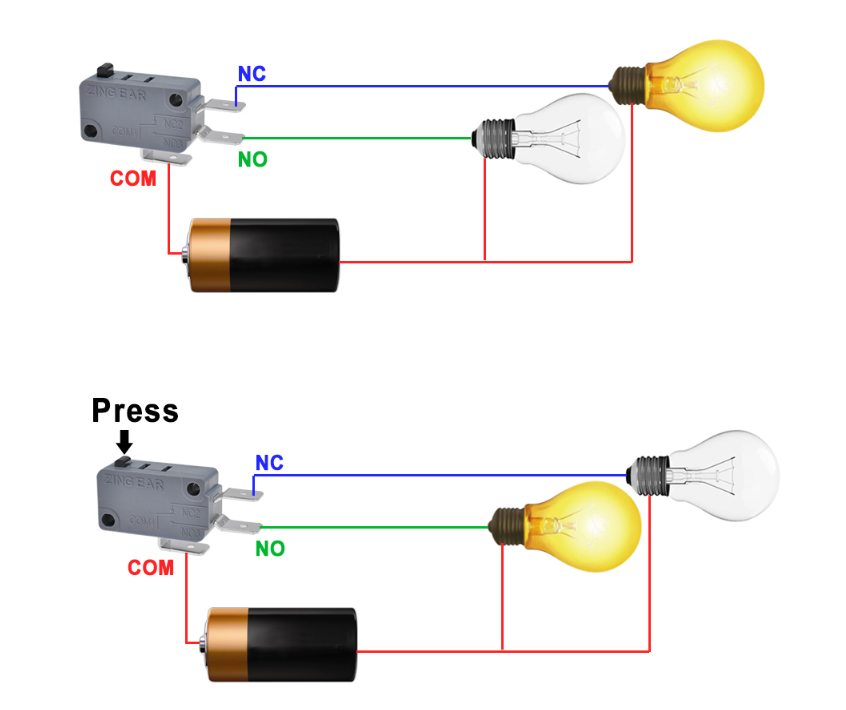
SPDT microswitches have a common terminal (COM), a normally open terminal (NO), and a normally closed terminal (NC). When the switch is not pressed, the COM and NC are turned on; When the switch is pressed, the COM and NO are turned on. This configuration is often used when two circuits need to be switched.
DPDT (Double Pole Double Throw)
DPDT micro switches are equivalent to two independent SPDT switches. It has two COM terminals, each corresponding to a NO and an NC terminal. DPDT switches can be used in applications that require switching between two independent circuits at the same time, such as motor commutation control.
SPST NC (SPST, Normally Closed)
When the SPST NC micro switch is not pressed, the COM terminal is connected with the NC terminal; When the switch is pressed, the circuit is disconnected. These switches are typically used in safety circuits or control circuits that require a normally closed state.
SPST NO (SPST normally open)
When the SPST NO micro switch is not pressed, the COM terminal is disconnected from the NO terminal; When the switch is pressed, the circuit is turned on. It is often used in control circuits that require an always-on state, such as door switches.
DPST NO (Double Pole Single Throw Normally Open)
The DPST NO microswitch is equivalent to two independent SPST NO switches. They are typically used where two independent circuits need to be controlled at the same time, such as dual-circuit control systems.
DPST NC (Double Pole Single Throw Normally Closed)
The DPST NC microswitch is equivalent to two independent SPST NC switches. Typically used in circuits that require dual safety or redundant control.
Micro Switch Wiring Diagram
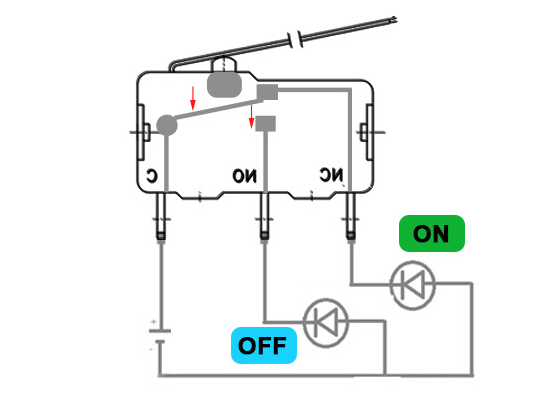
Taking SPDT as an example, the following is the micro switch connection diagram, you can intuitively understand the working principle of the micro switch connection, the circuit turn-on current starts from the positive pole through the C-terminal terminal, because the internal connection bar is connected with the NC at this time, the current flows out from the NC terminal through the small bulb and emits light; When the lever of the micro switch is pressed, the internal connecting bar is pressed and connected with the NO, so that the small bulb at the NO terminal glows and the small bulb at the NC end is disconnected.
Precautions
When connecting the micro switch, please pay attention to the following points:
- Safety first:Make sure to disconnect the power supply before operation before connecting the micro switch to avoid the risk of electric shock.
- Correct selection of switches:Choose the appropriate micro switch according to the application requirements to ensure that its current and voltage parameters meet the requirements.
- Ensure that the connection is firm:In order to ensure that the connection process is not loose, it is recommended to use screws to fix the connection between the copper wire and the terminal, which is more suitable for non-professional operation, but it is still necessary to pay attention to safety matters during operation.
- Test and verification: After completing the connection, conduct a comprehensive test to ensure that the circuit is working properly.
Through the above steps, I believe you have a deeper understanding of the connection and working principle of the micro switch, in order to ensure safety, it is recommended to connect the micro switch should find relevant professionals to operate, non-professionals please consider carefully. Professional things are left to professional people to operate, there are wired micro switches, the wiring is firm and reliable, the sealing is good and can reach the IP67 level of waterproof and dustproof effect, Unionwell is the micro switch expert in your life.
Recommended reading related articles:SPST vs. SPDT vs. DPST vs. DPDT Switch:Their Differences And Use Cases
What you need to know about micro switches for charging gun
In-depth understanding of the types and characteristics of mechanical keyboard micro switches
Related Article