In-depth understanding of the types and characteristics of mechanical keyboard micro switches
We all want to be able to improve our work or gaming experience with a keyboard that works for us, so using a dedicated keyboard is the key to success. Mechanical keyboard switches are key components that affect the feel and performance of the keyboard. Therefore, for those users who love gaming or want to work and type comfortably, how to choose the right mechanical keyboard switch is crucial. This article will take an in-depth look at the types and characteristics of mechanical keyboard micro switches to help you find the most suitable mechanical keyboard switches for you.
What is a mechanical keyboard switch
Mechanical keyboard switch is the core component used to detect key operation in mechanical keyboard. An independent micro switch is installed under each button, and the signal is transmitted by pressing the switch. Compared with traditional membrane keyboards, mechanical keyboard switches have a higher response speed and longer service life, which is widely loved by office typists and game enthusiasts.
The working principle of mechanical keyboard switches is based on the design of micro switches. The micro switch consists of a spring and a contact, when the key is pressed, the spring is compressed, the contacts are contacted, and the circuit connection is completed. This design not only provides more defined key feedback, but also extends the life of the keyboard.

The types of mechanical keyboards
According to the internal design and working principle of the mechanical keyboard switch is divided into a variety of types, generally can be divided into blue switch, red switch, black switch, brown switch and blue switch, each type has a unique feel, sound and applicable scene, according to personal habits, work needs and preferences to choose the appropriate micro switch type.
Features of different mechanical keyboard switches
In order to cope with different purposes, mechanical keyboard switches can be divided into a variety of types, each type has its own unique feel and characteristics. In order to have a more intuitive understanding of the performance and characteristics of different mechanical keyboard switches, we can compare them through the following charts:
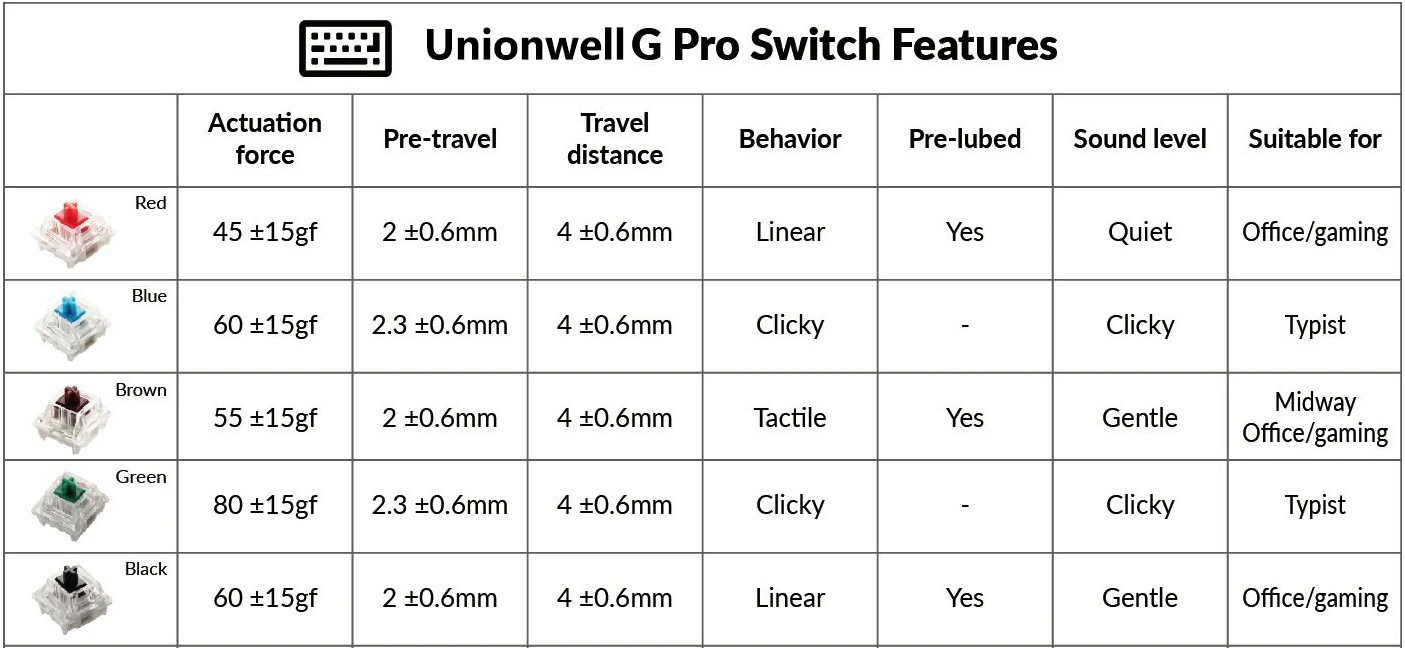
Red Switch: The red switch has no sense of passage, the pressing process is very smooth, and the operating force is light, so the noise is low when used. The red switch is very suitable for gamers, its light operation force and smooth feel, can react quickly and continuous keys, so that players have a better operating experience, and of course, it is also suitable for long-term typing.
Blue Shaft: The blue shaft has a unique clicky touch and a louder sound, so it is also not suitable for use in quiet places. The blue axis is similar to the blue axis, the initial operating force and bottoming pressure are greater than the blue axis, so it can be said that the blue axis is a weakened version of the blue axis, but it is "softer" but a little more "heavy" than the blue axis.
Brown Switch: The brown switch is between the green and red switches, with a slight sense of passage, but not as obvious as the green switch, and the sound is smaller. Brown switch is a type of switch with good comprehensive performance, whether it is frequent typing, games, or daily work needs, brown switch is a good choice.
Green Switch: The blue switch is known for its obvious sense of passage and crisp clicking sound, and there will be an obvious "click" sound every time it is pressed, providing users with clear tactile feedback, effectively improving the accuracy and speed of typing, so it is the first choice for mechanical keyboards for typing work, but it needs to be used with caution in quiet places (be careful of being kicked out because it is too noisy~!)。
Black switch: The black switch is similar to the red switch, the black switch is the same as the red switch, there is no sense of passage and the press is smooth, but the operation force is greater, especially suitable for those who are used to pressing the keys hard, the sound is louder, because it requires a larger operating force to reduce the occurrence of mispresses.
Choose high-quality mechanical keyboard switches
High-quality switches are usually made with precision machining and high-quality materials to ensure the longevity and durability of keypad switches. Typically, mechanical keyboard switches have a key life of up to 100 million times, ensuring high frequency use and long-term stability. Choosing a well-known manufacturer of mechanical keyboard switches is the key to quality assurance, and well-known brands usually have high quality control standards and long-term market validation.
Unionwell, with its nearly 30 years of experience in micro switch manufacturing, the mechanical keyboard switches produced are known for their high quality and reliability, with a service life of more than 100 million times. Unionwell has an independent test laboratory and rigorously tests the switches to ensure that the switches can withstand 100 million presses, and the switch in one direction needs to be carried out non-stop for half a year. This high-life and high-reliability switch provides a longer life and a better typing experience for the keyboard!
How to buy quality mechanical keyboard switches
Unionwell's GT02 series micro switches are mainly used in mechanical keyboards, and the high-quality micro switches provide a reliable trigger and feedback mechanism for the keyboard. Because of its high reliability and long life, it is loved by the majority of mechanical keyboard manufacturers.

Choosing the right mechanical keyboard switch is the key to enhancing your typing and gaming experience. Understanding the types and characteristics of mechanical keyboard switches can help you find the type of switch that suits you best. Whether it is the crisp feedback of the blue switch, the smooth feel of the red switch, the strong operation force of the black switch, or the comprehensive performance of the brown switch, it has its unique advantages. If you want to know what type of keyboard you are suitable for, you still need to experience and understand the specific type of switch yourself.
5 Steps To Connect The Micro Switch
Performance and use of refiner microswitch
Related Article